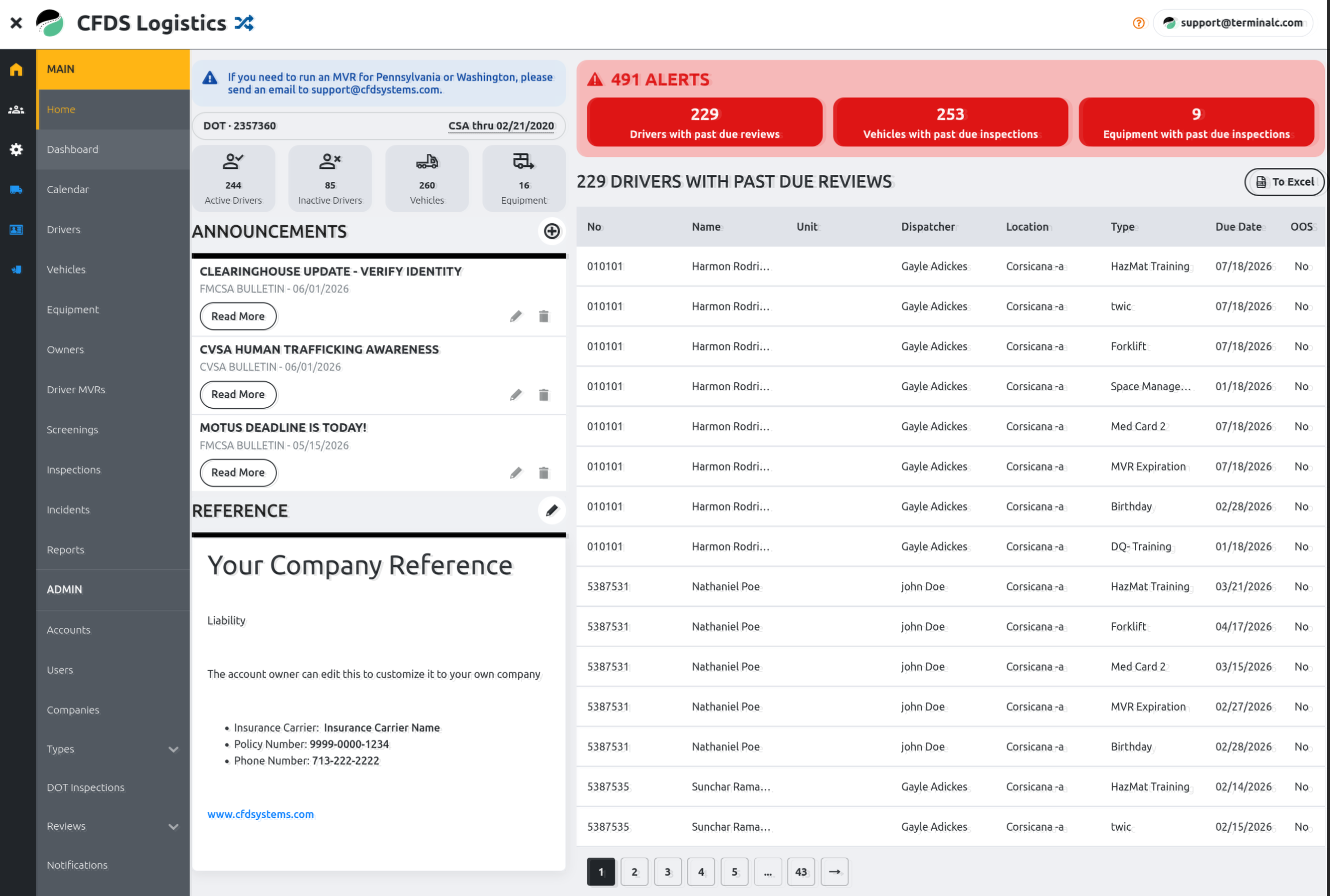
1. Improved Navigation Menu
To provide more screen space and eliminate awkward mode changes, the main navigation menu has been moved from the top of the page to a dynamic left-side panel.
- Hover over the left menu bar to instantly expand it and scroll through your options.
- Click the hamburger icon in the top-left corner to pin the menu open. Click the X to close it.
- Menu items have been slightly reorganized to improve workflow, but no features have been removed.
2. Redesigned Home Page
Alerts are now prominently featured on the Home page for immediate visibility.
- Clicking a red alert will display its details in the main content area.
- To accommodate this cleaner look, the Announcements and Reference sections have been moved to the side.
3. MVRs & Screenings
For easier access, MVRs and Screenings have been promoted to the main menu.
3a. Driver MVRs
- View a complete list of your drivers alongside their most recent MVR dates and upcoming due dates.
- This page now consolidates both system-requested MVRs and manually attached MVR documents into a single view.
- You can also request MVRs in bulk, download them as a consolidated PDF, and generate Driver Briefs for counseling sessions.
3b. Screenings
- Easily request Criminal County and Statewide background checks, Social Traces, and MVRs for driver qualification.
- We plan to expand our in-app screening offerings soon.
4. Integrated Document Viewer
A new slide-out document viewer has been added across all Document tabs, including Drivers, Vehicles, Equipment, and Incidents.
- Click any underlined document name to view it directly within the app, eliminating the need to download files just to see what they are.
- From the viewer, you can page through lists, download, edit, or delete documents.
- Batch selection is still supported by clicking on document thumbnails.